
Authorized Kyocera Dealer • Randolph, NJ
Kyocera TASKalfa MZ7001ci Series Color Multifunction Printers
Local technicians. Guaranteed response times. No automatic annual increases on your agreement.
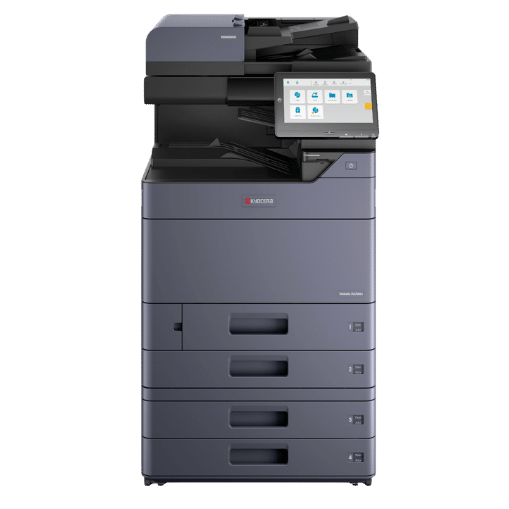
25–70 ppm
Color & B/W speed
7,150
Max sheet capacity
274 ipm
Duplex scan speed
10.1″
Color touchscreen
The Lineup
Six models, one platform
TASKalfa MZ2501ci
Up to 25 ppm color & black
- First copy out 6.4 sec black, 8.5 sec color
- Sized for small workgroups and branch offices
- Same controller and accessories as the rest of the series
TASKalfa MZ3501ci
Up to 35 ppm color & black
- First copy out 5.3 sec black, 7.0 sec color
- Step-up speed without a footprint change
- Good fit for a floor of 15 to 25 people
TASKalfa MZ4001ci
Up to 40 ppm color & black
- First copy out 4.5 sec black, 5.9 sec color
- The volume sweet spot for most NJ offices
- Where our color quotes land more often than not
TASKalfa MZ5001ci
Up to 50 ppm color & black
- First copy out 3.7 sec black, 4.8 sec color
- Built for busy central copy rooms
- Clears a morning queue without anyone waiting
TASKalfa MZ6001ci
Up to 60 ppm color & black
- First copy out 3.4 sec black, 4.4 sec color
- High-volume departments and shared floors
- Pairs naturally with the 4,000-sheet finisher
TASKalfa MZ7001ci
Up to 70 ppm color & black
- First copy out 3.4 sec black, 4.4 sec color
- Top of the series, 70 ppm letter size
- Headroom for growth without moving platforms
Not sure which one?
We size it from your actual meters
- We pull your current volume and cost per page
- We model the right engine, feeder and finisher
- No obligation, no cost
| Specification | MZ2501ci | MZ3501ci | MZ4001ci | MZ5001ci | MZ6001ci | MZ7001ci |
|---|---|---|---|---|---|---|
| Print/copy speed (color & black) | 25 ppm | 35 ppm | 40 ppm | 50 ppm | 60 ppm | 70 ppm |
| ADS recommended monthly volume | 3,000–8,000 | 5,000–12,000 | 8,000–18,000 | 12,000–25,000 | 15,000–35,000 | 20,000–45,000 |
| First copy out, black | 6.4 sec | 5.3 sec | 4.5 sec | 3.7 sec | 3.4 sec | 3.4 sec |
| First copy out, color | 8.5 sec | 7.0 sec | 5.9 sec | 4.8 sec | 4.4 sec | 4.4 sec |
| Warm-up from power on | 9.7 sec | 9.7 sec | 14.4 sec | 14.4 sec | 14.4 sec | 25 sec |
| Document processor | Optional: DP-7150 140-sheet reverse, or DP-7160 / DP-7170 320-sheet dual scan | |||||
| Scan speed (dual scan) | Up to 137 ipm simplex, 274 ipm duplex | |||||
| Paper capacity | 1,150 sheets standard, up to 7,150 sheets | |||||
| Dimensions (W x D x H) | 23.7” x 26.1” x 31.1” | |||||
| Weight | Approx. 182 lb. to 209.4 lb. depending on model | |||||
What Makes It Different
Kyocera built this one around what happens after the sale
AI that fixes the scan before you see it
Image Defect Prevention, Tilted Document Correction, Super Resolution, Multiple Cropping and Handwriting Enhancement all run on the device. The practical effect is fewer rescans: a crooked page comes back straight, a faint handwritten note comes back readable, and a stack of receipts comes back as separate cropped files.
Three cloud apps, already installed
Kyocera Cloud Print and Scan removes the on-premise print server. Kyocera Cloud Capture indexes what you scan and handles eSignature. Kyocera Cloud Information Manager gives you keyword search across the archive. They ship on the device rather than as a project you fund later.
Security by design, not by checklist
FIPS 140-3 validated encryption, AES 256 on the SSD, TLS 1.3 on the wire, secure boot with run-time integrity checks, S/MIME, OAuth 2.0 and Microsoft modern authentication. Card authentication and secure print release cover the walk-up side. Three preset security levels get you configured without setting fifty options by hand.
Drums rated to 600,000 images
This is the part Kyocera has always been about. Long-life components mean fewer service events and fewer consumables in the waste stream, and Kyocera puts the drum life at up to three times what other manufacturers rate. BLI named Kyocera the Most Reliable A3 Brand for 2025 to 2027. It also holds the BLI Most Color Consistent A3 Brand award.
320 sheets in, 274 images a minute out
The dual scan document processor takes 320 sheets and runs up to 274 images per minute duplex. Front and back scan handles up to 16 sheets at once, and ID card scan puts both sides on one page. The processor is an option on every model, so you size it to how much scanning you actually do.
Finishing, folding and 12 x 48 banners
Finishers from a 1,000-sheet, 50-staple unit up to a 4,000-sheet, 100-staple unit, plus booklet making, tri-fold, Z-fold, hole punch, a 7-bin mailbox and an inserter. The multi-purpose tray takes banner stock to 12 x 48 in. and cover weights to 166 lb. index, so the jobs you outsource now can come back in-house.
See It Work
Kyocera TASKalfa MZ7001 Series overview
- The 10.1-inch panel and how the cloud apps sit on it
- Where the AI scanning corrections happen
- What the 320-sheet dual scan processor changes about a stack of paper
Full Kyocera TASKalfa MZ7001ci Series specifications
| Shared platform specifications, MZ2501ci through MZ7001ci | |
|---|---|
| Functions | Print, copy, scan, email; optional G3 fax with 33.6 Kbps modem |
| Print speed | Up to 25, 35, 40, 50, 60 or 70 ppm letter size depending on model, the same in color and black-and-white |
| Print resolution | True 1200 × 1200 dpi; enhanced up to 4800 × 1200 dpi |
| Copy and scan resolution | 600 × 600 dpi |
| Processor | ARM Cortex-A53 class controller |
| Memory | 4 GB RAM standard |
| Storage | 256 GB SSD standard; 1 TB HDD optional |
| User interface | 10.1-inch color touchscreen control panel |
| Paper capacity, standard | 1,150 sheets: two 500-sheet cassettes plus a 150-sheet multi-purpose tray |
| Paper capacity, maximum | Up to 7,150 sheets with additional 500-sheet cassettes, dual 1,500-sheet cassettes and the 3,000-sheet large capacity side tray |
| Output capacity | Up to 4,000 sheets with an external finisher |
| Paper sizes | Cassettes 5.5 × 8.5 in. to 12 × 18 in.; multi-purpose tray up to 12 × 48 in. banner; maximum original 11 × 17 in. |
| Paper weights | 14 lb. bond to 166 lb. index (52 to 300 gsm) |
| Duplex | Automatic two-sided copying and printing, standard |
| Document processor | Optional. DP-7150: 140 sheets, up to 80 ipm simplex. DP-7160 and DP-7170: 320 sheets, dual scan, up to 137 ipm simplex and 274 ipm duplex; DP-7170 adds double feed detection |
| Scan destinations | Scan to folder (SMB), email, FTP and USB; TWAIN, WSD and DSM supported |
| Scan file formats | PDF, searchable PDF with OCR, encrypted PDF, TIFF, JPEG, XPS, OpenXPS and Microsoft Office file types |
| Cloud applications | Kyocera Cloud Print and Scan, Kyocera Cloud Capture and Kyocera Cloud Information Manager, installed at the factory |
| AI-assisted scanning | Image Defect Prevention, Tilted Document Correction, Super Resolution, Multiple Cropping and Handwriting Enhancement |
| Connectivity | Gigabit Ethernet 1000Base-T / 100Base-TX / 10Base-T with IPv4, IPv6 and IPSec; optional dual NIC and 2.4 GHz / 5 GHz wireless LAN |
| Mobile printing | Apple AirPrint, Mopria, KYOCERA Mobile Print and Kyocera Cloud Print and Scan |
| Security | FIPS 140-3 encryption, AES 256 data storage encryption, TLS 1.3, secure boot with run-time integrity checks, S/MIME, OAuth 2.0, Microsoft modern authentication, card authentication, secure print release, IP filtering, LDAP, three preset security level configurations, SNMP v3 and SIEM or syslog monitoring |
| Finishing options | DF-7100 internal stack; DF-7120 1,000-sheet with 50-sheet stapling; DF-7140 4,000-sheet with 65-sheet stapling; DF-7150 4,000-sheet with 100-sheet stapling; internal 2/3-hole punch, job separator and shift tray; external booklet, tri-fold, Z-fold, 7-bin mailbox and inserter units |
| Component life | Drums rated up to 600,000 images |
| Dimensions (W × D × H) | 23.7 in. × 26.1 in. × 31.1 in. |
| Weight | Approx. 182 lb. to 209.4 lb. depending on model |
| Certifications | ENERGY STAR qualified and EPEAT registered |
| Sustainability | Long-life components, Toner Lock technology, ECO footPRINT toner recycling program; roughly 30% of the plastics used in Kyocera products are recycled |
Speeds, features, configurations and specifications are based on Kyocera published product information and are subject to change. Contact us for the current configured specification sheet for the model you are considering.
Downloads
Spec sheets, brochures and support
Who It Fits
Where the TASKalfa MZ7001ci Series earns its keep in New Jersey
Law firms
A 320-sheet dual scan processor that clears a discovery box without babysitting, saddle-stitched closing binders, secure print release so nothing sits in the output tray, and audit logging for client confidentiality obligations.
Healthcare
FIPS 140-3 encryption, card authentication at the panel and scan workflows into the EMR. See our healthcare page for how we document controls at install.
Education
Tabloid output for curriculum materials, booklet finishing for program guides, per-department accounting, and directory authentication that fits a campus network.
Government & municipal
FIPS 140-3 validated encryption, records retention scanning, agenda packet production with fold and staple in one pass, and cooperative purchasing contract availability.
Financial services
Encrypted SSD, secure release printing, retention-friendly scan workflows, and statements or proposals produced in-house rather than outsourced.
Manufacturing
Tabloid drawings and work instructions, 12 x 48 in. banner output for line-side signage, and stock up to 166 lb. index for tags and job travelers.
The machine is the easy part
- Local W-2 technicians based in Randolph, not a subcontracted dispatch pool
- Guaranteed response times written into the agreement
- Transparent cost per page with no automatic annual escalators buried in the fine print
- Installation, network integration, driver deployment and onsite user training included
- Automated toner fulfillment and remote meter reads
- Authorized for Kyocera, Sharp, Xerox and FP Mailing, so the recommendation is not forced by a single line card
Sales, service and supplies across Northern New Jersey
Morris County
- Randolph
- Morristown
- Parsippany
- Dover
- Denville
Essex County
- Newark
- East Orange
- Bloomfield
- Livingston
Bergen County
- Hackensack
- Teaneck
- Fort Lee
- Paramus
Passaic County
- Paterson
- Clifton
- Wayne
- Passaic
Union County
- Elizabeth
- Union
- Plainfield
- Westfield
Somerset County
- Bridgewater
- Franklin Twp.
- Hillsborough
- Westfield
Sussex & Warren
- Sparta
- Newton
- Hackettstown
- Phillipsburg
Hudson & Hunterdon
- Jersey City
- Bayonne
- Flemington
- Clinton
Questions
Kyocera TASKalfa MZ7001ci Series FAQ
What is EvolutionNext, and how is it different from the Evolution Series?
How much does a Kyocera MZ7001ci cost?
Which model should I choose?
What paper sizes and stocks does it handle?
Is it secure enough for healthcare, legal and government use?
It is built for it. Encryption is FIPS 140-3 validated with AES 256 on the SSD and TLS 1.3 on the wire, and the device runs secure boot with run-time integrity checks. Access control covers card authentication, secure print release, IP filtering, LDAP and Microsoft modern authentication, with S/MIME and encrypted PDF creation on the document side. Kyocera ships three preset security level configurations so you are not hand-setting every option, and the fleet reports to SNMP v3 and to a SIEM or syslog collector. We help HIPAA-regulated and public-sector customers document these controls as part of installation.